








5
Free
BlackHole 2ch
Simple virtual audio routing tool
View an ad to download for free
Although there are numerous other programs which do the same thing, none had quite the feature set I was looking for. Most were windows that sat in a corner or on the desktop, which are inevitably obscured by document windows on a PowerBook's small screen. Those monitors which used the menubar mostly used the NSStatusItem API, which has the annoying tendency to totally reorder my menubar on every login.
The MenuMeters monitors are true SystemUIServer plugins (also known as Menu Extras). This means they can be reordered using command-drag and remember their positions in the menubar across logins and restarts.
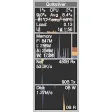
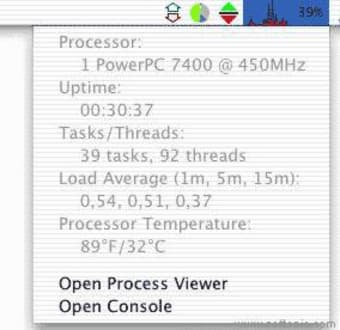
The CPU Meter can display system load both as a total percentage, or broken out as user and system time. It can also graph user and system load and display the load as a "thermometer". The menu for the CPU Meter contains several pieces of information I like to have a single click away (uptime, load average, open Process Viewer, open Console).
The Disk Activity Meter displays disk activity to local disks on the system (anything that is a IOKit BlockStorage driver). It is hotplug aware, and will show activity on FireWire and USB disks as they are mounted. The Disk Meter menu shows volume space details for local drives (it does not display mounted network volumes for speed reasons).
The Memory Meter can display current memory usage as either a pie chart, thermometer, history graph, or as used/free totals. The Memory Meter menu shows a breakdown of current memory usage and VM statistics. The Memory Meter can optionally display a paging indicator light.
The Net Meter can display network throughput as arrows, bytes per second, and/or as a graph. Both the arrows and the graph are scaled using a user-selected scaling factor and calculation. Scaling can be done on the basis of actual link speed reported by the network interface or peak traffic and can use one of several scaling calculations. The Net Meter menu shows current interfaces and their status. Interface information is gathered from the SystemConfiguraton framework and thus is MacOS X network location aware

Monitor your Mac's performance in real time
Monitor all aspects of your Mac's activity
Comprehensive Monitoring Tool for Mac Users
Free
Mac
Mac OS X
English
13.5K
1.83 MB
View an ad to download for free
Have you tried MenuMeters? Be the first to leave your opinion!
Add reviewMonitor your Mac's performance in real time
Monitor all aspects of your Mac's activity
Comprehensive Monitoring Tool for Mac Users

Compact system monitoring tool
Test the temperature of your Mac
Flexible Software to Monitor the Performance of Personal Computers

Solve your Mac’s overheating issues

Repair corrupt, damaged or unplayable MOV or MP4 video file with help of Remo Repair MOV for Mac

Streamline Your Streaming with OBS Background Removal

Premium tool to speed up your Mac

Comprehensive Dive Planning with Suunto DM5

Effortlessly Create Time Lapse Movies with GlueMotion

Effortless Messaging with Telegram A on Mac

JT-Bridge: Seamless Integration for Ham Radio

Comprehensive Video Editing with UniConverter

Easily uninstall applications